




We built and tested a video chat app for real-time communication for remote teams and personal chat. With that experience, we compiled the step-by-step procedure to create a custom video calling app in this guide.
This covers the market value, building approach, benefits, and key features to make a secure video chat app in 2026.
Now, let’s look into the details.
Video Chat Apps have become an integral part of our daily lives. Whether it is small talk with friends and family or remote work, video calls are becoming increasingly popular every day.
With that said, the demand for advanced features and convenient connection methods is challenging developers to grow more competitive. So, how can you build a video chat app that stands out in the global market?
Well, in this article, we’ll address the following in detail:
- Needs of your users
- Video call app development overview
- Strategies, and monetization method
So, let’s look into the details.
Market Overview: Video Chat Apps
The post-pandemic years are experiencing a serious shift in the way many businesses operate around the world. Right from the start of 2022, most organizations have converted their operations from remote locations.
As per Statista, the usage of live chat in mobile apps has drastically increased from 17% to 44% in the US. In the same period, the market evaluation rose from $4.21B to $6.28B. Is expected to reach a whopping $16B by 2030.
Employees have started to work right from the comfort of their couches. And they can attend official meetings from anywhere, anytime. All thanks to live video chat apps!
On the other side, the live video call app development market is becoming more and more competitive than ever before. Developers are expected to innovate and build apps that are faster, secure, and reliable.
So, we took this into our research to find the best options to build a video chat app. And that’s what we’ll explore together in this article. Let’s get started!
Build Your Own Video Chat App with World Class Features!

- Complete Source Code
- Lifetime Data Ownership
- Deploy on Own Server
Video Chat API vs. Building From Scratch: Which One To Choose?
We understand that sometimes you prefer to build every part of your app, yourself. But do you think that would be wise?
It’s actually a Yes and No, subjective to each project, which means you need to figure out which decision is best for your app and business.
So, we are addressing 3 different factors to compare the development methods: In-house vs Using a third-party API.
1. Capacity to Handle Operational Complexities
The foremost factor to arrive at a decision is to analyze if you are well equipped with the resources to run every operation of your app development.
If you have a huge app project, this may require tools and developers that have a high bar of expertise.
Now, this is one factor that can be easily sorted by using a pre-built video chat API. It just saves you all the time you need to spend working on the codes, purchasing tools and hiring developers.
In just one package, all your operational needs are met, effortlessly.
2. Capital Requirements For The Project
Nevertheless, developing an app in-house requires you to back yourself up with a huge capital. The upfront cost at each stage of development may demand you to spend without any compromise.
Whereas, with pre-built APIs, you have a choice. Based on the stages of development, you can choose features and packages and pay only for what you use.
The best part is, you will not be sidetracked to spend on unimportant features/ functionalities, as the providers will have a set of items you’ll need to put your focus on.
3. Launch Time
Compare spending months developing your app vs launching it in the next hour.
No, we are not exaggerating!
Typically, that’s what APIs are built for. They are pre-written codes, that you may actually need to spend months writing, testing and debugging, instead.
It takes only the next few minutes to launch your app, if you go with an API. The logic is simple!
4. Security Reasons
You know it all – the recent news of app breaches and how user information is stolen for multiple malicious intents.
That cannot happen to your platform.
If you are building in-house, you need to figure it all by yourself about every encryption and privacy regulation that your app must be built upon.
That’s truly worth an effort.
But what if we say, it is all already figured out by the API providers, and if you need any specific customization with these encryptions/ industry regulations, they can handle even that without leaving you to sweat the stuff.
Simple, right?
There are several reasons we could go on with advocating why pre-built APIs are better than in-house development in this competitive market.
However, we leave it to you to study this subject matter even intensely to identify which works the best for your platform.
What Are The Benefits Of Integrating Video Chat API?
There are challenges in building apps from scratch. But leaving them aside, here’s a question:
Do you think you can go with the option?
If you slide towards a know, we’ll tell you why it is a good choice.
Pre-built APIs are pretty much the go-to choice of most developers and we’d like to give out a few interesting reasons.
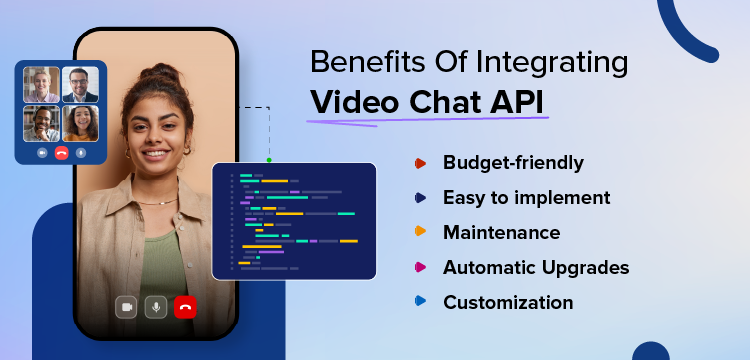
- It’s budget-friendly
Most of the time, a video API is much cheaper when compared to building apps from scratch.
This is because, everything about the app development – features, customization and deployment is covered in the API, rather than you having to spend it all on each factor.
- Easy to implement
There are 2 things when it comes to integration here – how easy APIs make it to develop the app and the support you will get from the providers.
In the case of building from scratch, you’ll need to figure it all by yourself, and you will not have technical assistance, you can rely on when you are stuck in the middle of the process.
- Maintenance is take care of
One other exciting advantage of using pre-built APIs is that you need not monitor every part of the infrastructure.
The vendor does the monitoring work and you can focus on what really matters to your platform and business.
- Upgrades happen automatically
When it comes to software upgrades for the API, you’ll have it done right on time automatically whenever the vendor releases one.
You need not manually look to make things compatible to run on devices, or leave users hanging with technical glitches.
- You can customize it
Most cases why a few companies prefer to build apps all by themselves is the level of customization they fear missing out in the APIs.
But technology has evolved.
APIs can now be customized to a point where it is equivalent to building every part of your app from scratch.
You can even bring on colors, logo and custom elements of your brand and make the app look like it is fully built in-house.
Above this, you can white-label it. You can go without mentioning the provider’s name anywhere on your app, securing the brand’s tone and style everywhere on the platform.
Top 10 Key Features to Make a Video Call App (2026 Guide)
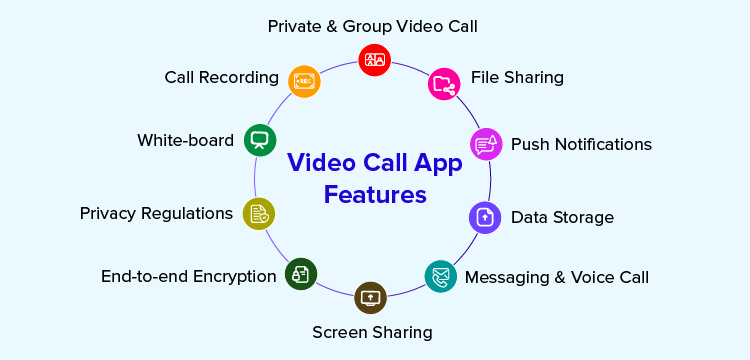
You’ll find an extensive range of features in a Video Chat API. From basics to advanced features, you can integrate them all into your app, and customize it as much as you want.
- Private & Group Video Chat
- Screen Sharing
- White-board
- Call Recording
- File Sharing
- Push Notifications
- Data Storage
- End-to-end Encryption
- Privacy Regulations
- Messaging & Voice Call
Let’s first explore the features you’ll eventually find in these APIs.
1. Private & Group Video Chat
Users on your app can meet other users face-to-face, in a virtual online meeting. The conversation can happen just between 2 individuals or a group of users and the API can accommodate them all.
2. Screen Sharing
Businesses that require a video chat find screen sharing an essential feature to discuss projects with clients. Similarly, teachers can share their lessons with students and sellers can showcase their products to buyers.
For multiple reasons, screen sharing has become the new-age stage for presenting stuff, when online.
3. White-board
An effective meeting involves immersive conversations with hand-written points or drawings. Businesses need them to bring clients into focus and white-board feature serves this purpose well.
4. Call Recording
It is important for businesses to record the ongoing sessions and officially document them as proof/ evidence of the projects handled.
On the other hand, sessions recorded can also be used for training purposes, with underlying privacy conditions of the organization. These recordings can be integrated into mentoring software to facilitate the sharing and analysis of sessions for training and development.
5. File Sharing
People may need to share video content or even the recording of the calls for official purposes.
The APIs support file and media sharing features that help users share documents, images, video and GIF content for better collaboration.
6. Push Notifications
Users will need an alert whenever they receive an incoming call from other users on the app.
You need not do anything out of the box to bring in this feature. The API covers it already.
7. Data Storage
Every conversation that happens requires its data to be stored in the platform’s infrastructure.
These pre-built APIs take care of how every data is stored on the app, for better user management and call management.
8. End-to-end Encryption
Users need to feel safe when they use your app to show their faces and have conversations with others.
Their identity, or images or videos cannot be stolen at any cost. Above your brand’s image, the user might be put to potential risks and threats, when any of their trusted information is stolen.
This is where you’ll need encryption protocols. Rather than building security with these protocols, APIs come with the features built-in.
This way, both you and your users need not worry about any intrusion of third-parties when users are having a conversation.
In fact, not even your team will be able to access the chats or call data as all of them will be deciphered with the encryption protocols.
9. Privacy Regulations
The privacy standards of apps differ from one country to another. Plus, it differs from one use case to another.
That is, European countries require your platform to abide by GDPR that requires your app to get the consent of the users before you get their personal information to access your platform.
On the other hand, HIPAA regulations need you to ensure that not any piece of Patient Health Information (PHI) is shared to others without the consent of the patients using your app.
Likewise, for specific regions like Cambodia and Switzerland, they require unique regulations to be met, before you can give your app to use for their people.
This challenge is sorted by APIs that come in adherence with all the necessary global regulations, plus options to customize them in accordance with the regions.
10. Messaging & Voice Call
Tell us about a video calling app that does not have chat these days. Yes, APIs come with real-time in-app messaging to give users the option to send and receive direct messages.
Plus, APIs give users the option to switch to voice calls whenever they prefer just a quick audio conversation, where video calling is unnecessary.
5 Steps to Build a Video Calling App (2026 Guide)
- Step 1: Find Out Who Your Target Users Are
- Step 2: Keep An Eye On How Much You Spend
- Step 3: Plan The Phases Of Your Development
- Step 4: Figure Out The Tech Stack You Need
- Step 5: Build The UI For User Experience
As we discussed above, integrating video calling into apps is truly the effortless way to add the functionality to any existing app.
Even if you do not have an app already, you can build it on top of a sample app that is ready for use.
Well, let’s begin with the steps:
Step 1: Find Out Who Your Target Users Are
The foundation of any business is understanding who they’ll build the product/ service for. In this case, developers must have full clarity over who they are building this app for.
Also, you must do the basic homework like the number of users to target, the scope of features you need to cover, and consider factors like demography, use case and age group, to offer a more personalized experience on your platform.
Step 2: Keep An Eye On How Much You Spend
You have a budget and you need to ensure to stick to it maximum to avoid burnout. For cases where your expenses may go out of hand, you should ensure that you have a backup.
This way, you can seamlessly run your project without holding parts of them due to unexpected budgetary concerns.
Is there a solution?
Why not? APIs come with structured pricing plans and they help you keep things under control.
You simply need to analyze which of the plans best suit your calculated budget and go with it.
Step 3: Plan The Phases Of Your Development
To execute it all, you need a clear plan you can stick on to. You need to segregate your entire development process into multiple phases so you can focus on each phase, tick it off and go ahead with the next one for steady progress.
Moreover, this will help you avoid your tasks getting overwhelming, if done without clarity.
Step 4: Figure Out The Tech Stack You Need
You’ll not need all the technologies to build your platform. You need specific ones that do the job right as you want it.
So, sit down to prepare a list of the features and functionalities you need, and how exactly you need them. This will help you find out the exact technology you can use for your platform.
Break down the details of the infrastructure you aim to develop both frontend and backend and derive what exactly you need to build each feature and functionality.
Step 5: Build The UI For User Experience
The first look of your app is what attracts customers to your platform. If it’s going to look clumsy, people would not even consider exploring it, even if you have the best features and technology built behind a messy UI.
This is where you need to check the options to customize the UI when you are building your app with a video chat API.
Make sure you bring on features that keep your users interactive and a navigation that is smooth and well-planned. You users cannot be stuck in the middle of nowhere when using your app.
Recommended Reading
Can You Add Video Chat SDK In Just 10 Mins?
Absolutely!
Most providers in the market offer video chat APIs that you can integrate into your app within an hour. But there’s a fastest API among them all that lets you do the entire integration in a record-breaking 10 minute timeline.
Imagine having a fully functional app you dreamed of for years, in the next 10 mins for launch! We are not exaggerating, because MirrorFly has been in the industry for around 17+ years and is a leader because they understand the ins and outs of what exactly the customers need with respect to in-app communication.
As a reflection of their expertise, the team built a video chat API that can be added to your app in 10 mins.
But, is that all about the API, faster launch?
No way!
MirrorFly has many other exciting reasons why it is a leader in CPaaS and brands trust the provider with an unshakeable trust.
- It comes with 100% customizable video chat API which means you can personalize it as much as you want it.
- You get full access to the source code of the solution.
- Add your own logo, colors and brand elements, and typically white-label your platform, built on top of MirrorFly’s underlying technology.
- You can host on any server – your own or MirrorFly’s multi-tenant cloud servers
- Users can send and receive files of any size without any limitations
- And there’s a lot more, but we do not prefer to make this all promotional about the provider. So we request you to visit the official website and explore yourself about a ton more exciting benefits of choosing MirrorFly as your video chat API provider.
We hope we’ve given you useful information on how to build a video chat app in this article. If you found this helpful, your comments would encourage us to write more.
Looking To Build Your Own Custom Video Chat App?
Get our enterprise-grade communication solution, that can be set up on your company servers.
Request Demo 100% customizable
-
On-premise hosting
-
Multi tenancy
 100% customizable
Frequently Asked Questions (FAQ)
List the basic features of a video chat app?
Some of the best features of video chat apps include registration, profile management, contact list, video and voice calls, group calls, text chat, end-to-end encryption, and push notifications.
What is the procedure to build a video conferencing app like Zoom?
To build a video chat app it is a must to check for certain major things like technologies, protocols.
You must check for strategies such as
1. UI/UX Design
2. Backend development
3. Video streaming protocol integration
4. Testing stage
5. Tech stacks
6. team selection to accomplish the entire process.
What are the technologies that are used to make video call apps
The technologies needed for building video-calling applications are as follows,
1. Swift
2. Kotlin
3. Java
4. Node.Js
5. Spark
6. Amazon EC2 and Amazon S3
How to create a video chat app for iOS?
Before planning to build a video chat app for iOS, there are certain things to be considered.
1. Deciding whether yours is a full-fledged app or MVP.
2. Front-end and back-end elements
3. Testing stage
What is the procedure to build a video calling app from scratch?
To build a video chat app from scratch you need to perform the following steps:
1. Research the needs of your target audience.
2. Choose the features and functionalities you need.
3. Select the tech stack.
4. Hire a developers team.
5. Work on the budget of the project.
6. Start developing the video call app.
Related Articles
- Top 10 Live Video Calling APIs & SDKs In 2026
- How to Integrate Video Call API into Your Android & iOS Apps?
- How to Build a Video Calling App in Flutter?
- How To Develop A Video Chat App With JavaScript And WebRTC?


