

![How to Build an AI Voice Chat App – A Complete Guide[2026]](https://www.contus.com/blog/wp-content/uploads/2022/07/Audio-chat-app-development.webp)


Planning to create a voice chat app that’s trending in the market? Then this article is for you to derive the work culture of building a chat app either from scratch or using voice calling APIs.
What is a Voice Chat App?
Voice chat apps are chat applications that help users to communicate with each other through audio texts, one-to-one audio calls, and even send automated voice alerts via an internet connection. Voice chat is becoming more prominent these days because of its benefits like meaningful interactions, instant and effective communication, and knowledgeable collaboration.
Hence, if you are a business or a mobile or web developer keen to develop a voice chat app, you must have in mind the below listed features.

- Complete Source Code
- Lifetime Data Ownership
- Deploy on Own Server
6 Steps to Create a Custom AI Voice Chat App Like Discord
Here’s how to easily make your own Voice Chat APP in 6 simple steps:
Step 1: Research Your Market
Did you know why this step is the first and prime reason to focus on? Because an early analysis of the target market can get hold of who your audiences are and what they expect from a chat platform. Thus, helping you to develop products easily, quickly, and with a better finish.
And, to help you reach out to your potential users, follow the below research:
- Demographics: Get details of the user’s details like their age, their place of residence, and the devices they use.
- Behavior Aspects: This part includes what makes the users not use a website, their security expectations, and their likings of a web page.
Thus, having these in hand can help you with the next stage, which is opting for the best monetization platform.
Step 2: Choosing Apt Monetization Model
Clubbing the user persona obtained along with a blueprint to devise an exceptional in-app chat application, you might know how to choose the monetization model for your users.
As, by now, you would know how much would they pay, so try to include plans like,
- Subscription: Here in this plan, users pay a monthly or yearly subscription fee to access the service, which is more likely to be a SaaS-based revenue model.
- Freemium: Who doesn’t like a free plan? So keep this plan restricted to certain features and allow users to access those after paying a minimum fee.
- Advertising: Ads inside any app can cover expenses and help generate income. But, include this feature only if you have a strong user base.
- Ad Blocker: Some users may not like the ads in the chat app then this trait helps them to remove ads for a fee.
Step 3: Hire Development Team
This step is very crucial because you need a dedicated and skilled coder to complete the project milestones fixed by you. Only then, will your MVP or the so-called minimum viable product can be achieved without flaws.
It is also in this phase that leads sits with mobile or web developers and discusses the voice app development workflow, main features to include, and the app design concept.
Step 4: Creating An MVP
Building and launching an application like a voice chat app is huge, complex, and requires time. Therefore, it is always recommended to first go ahead with a minimum viable project first, test its technical performance, and then check out the user reviews. These factors will help you improve your step toward voice app development.
Step 5: Promoting Created App
Not only does your voice chat app would require a technical standpoint or knowledge because to make it successful, but you also would need to promote it in the market by,
- Launching a campaign: Create an informative and less gimmicky landing page and insert ads to know the interested subscribers.
- Influencer marketing: This useful tool will help in promotion as they could take your products to heights with blogging, advertising, and other activities.
- Organizing events: Attend local and international conferences or events to promote your product.
Step 6: Finally, Test Voice Chat App
Imagine you designed a beautiful dress that does not fit the person who ordered it. The same goes for this as well. After putting weights and tons over smooth product development, you must also ensure that those functionalities and logics work post detailed testing.
Therefore, never launch a fully-furnished product without doing any of these tests:
- Functional testing
- Test automation
- Usability testing
- Configuration and compatibility testing
- Integration testing
- Load and stress testing
Saw the steps to create your chat application for iOS, Android & Web platforms from the very basics? Do you still think it to be a wise option?
How to Create an AI Audio Chat App?
When it comes to building your voice chat app, you must first decide on your development strategy. Here are the things you should follow to make a voice chat
You have 2 choices:
- Build an AI voice chat app using ready-made APIs.
- Build it from scratch by hand-coding it end-to-end.
Now, deciding this is not easy. You can come to a conclusion only by valuing the below factors:
1. Time Frame
It’s always a big deal to finalize the cost and timeframe to make any voice android chat app. And, if you have to go for something from scratch, you have to consider so many factors like,
Mostly, if you have to go for something from scratch, you have to consider so many factors like,
- Need to hire an appropriate team of developers
- Look out for the infrastructure cost
- Work on each and every coding to build the better backend
But, if you opt for ready-made voice chat APIs, you can build a complete app within minutes. Moreover, voice API providers render complete developer support till deployment. build your own voice team So, you can sit back, stress-free.
2. Pricing
While planning to develop a voice chat app, it’s very important to make a cost estimation that is primarily based on the app’s complexity and feature requirements.
Here’s what you need to take into consideration:
- Whether you are building the app all by yourself/ with a team,
- The type of deployment you need to choose – on-premise/ on-cloud.
- The cost of infrastructure or tech stacks you need to invest in.
Now, as per our estimation, the cost of building a self hosted audio call app can cost you somewhere around $375,000 to over $1,070,000
Is that overwhelming for you? We’ve got an alternative solution.
You can go for a pre-built voice call solution like MirrorFly. This drastically reduces your spending value.
- You don’t need expertise to use the solution to create a white label your voice call app.
- You can deploy the app anywhere – on your own data centers or on MirrorFly’s cloud servers. It’s completely your choice & convenience.
- The cost of using a pre-built solution is way less than what you’ll spend when building from scratch. Our approximate estimation is somewhere between $35,000 and over $200,000.
Got the idea now?
Moving forward, let’s discuss how these voice chat apps have influenced a variety of industries.
While planning to develop a voice chat app, it’s very important to make a cost estimation which is majorly based on the app’s complexity and requirement of features.
Thus, MirrorFly provides two pricing options, a SaaS or Pay-as-you-go model that offers curated monthly & yearly packages and a self-managed or SaaP model that provides 100% customizable instant messaging software for all kinds of web & apps.
So yes, you can now easily plan the strategy for your app development with the given information. Further, let’s discuss how these voice chat apps Key features.
Top 20+ Key Features to Build an AI Voice Chat App
Nowadays, voice chat has become one of the essential needs of people for its robust features. Here, we are going to have a look at some of the most essential functionalities that any audio calling app must have.
Let’s talk about some of these features and functionalities based on some of the top voice chat apps in the town,
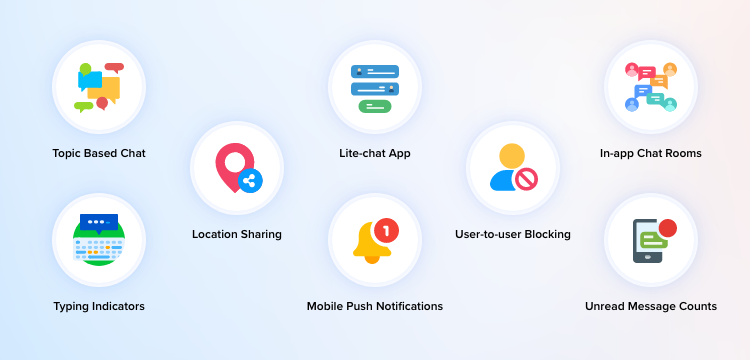
Let’s talk about some of these features and functionalities based on Discord.
1. Topic Based Chat
In your video chat app, you can organize conversations that are based on specific topics or themes. This increases the intensity of the conversations and connects users with potential prospects based on their interests.
2. Typing indicators
This feature notifies your users when someone is typing a message in a chat conversation. You can reduce the uncertainty and waiting times, as users can anticipate when a response is incoming. This increases the overall responsiveness of the conversations.
3. Push notifications
Even when the app is not open, you can alert users when there is an incoming message or activity. This is important for user attention and retention, with timely updates. In fact, this feature ensures that no important messages are missed.
4. Location Sharing
In a chat conversation, users can share their location details with the other user. This is specifically helpful for coordinating meetups and also for individual security during travel.
5. Join via links
Using this feature, users can join any meeting via an invite link, without having to enter the meeting ID and passcode manually. This seamlessly reduces the friction to join meetings or group conversations.
6. Chat Mentions
This feature in a video chat app is to notify or tag specific individuals within a group conversation using their username or handle. This is to alert or notify the tagged user for attention on the subject of conversation.
7. Chatbot
A chatbot is a modern feature that helps users get instant support via text or voice chat on your product or service with pre-fed responses by a personalized bot. This drastically reduces customer wait times to a query that can be immediately resolved by a bot, than to utilize human resources every time.
8. ChatGPT- powered Support
Get instant answers to your queries about the voice chat app development processes and ambiguities in code. The live assistance backed by ChatGPT gives instant answers to your queries about the SDK so you can seamlessly make your audio communication app, without any hassle.
9. Auto-thumbnail generator
Images, documents, multimedia files or URLs shared among users will need a thumbnail. This feature automatically generates the thumbnails for every element that is shared in a conversation. This improves the user experience by offering visual context and instant recognition of the content.
10. User-to-user Blocking
One user can block or restrict other users from messaging them in your chat app. This is especially to manage users that exhibit unwanted or disruptive behavior. This puts away harassment, spam and unwanted solicitations.
11. Unread Message Counts
In order to prioritize the attention of users to boost responsiveness, display the number of messages that are not read by the user. This is important for businesses to have an idea of the number of unattended conversations among agents and customers.
12. In-app Chat Rooms
In-app chat rooms let users create or join virtual spaces for group discussion, collaboration and social interaction in a chat app. This drives huge engagement among users who need to discuss specific topics and events.
13. Multiple Channels and Servers
Servers and channels play their role when it comes to building communities. You can create or join many channels of interest. As a channel admin, you will have the privilege to:
- Create voice and text channels
- Instruct users about their role
- Invite friends and others to join the server
- Can perform changes with the verification settings to avoid duplicate account creation
- Transfer all the authority to another account
14. Managing the Roles and Permissions
The admins have complete control over the roles and permissions. They can assign a variety of roles to the server and channel members, by making changes in every channel’s settings. These basic permissions involve,
- General permissions
- Text permissions
- Voice permissions
15. Voice and Chat Functionalities for Better Connection
You can make your interaction more valid and accountable with the usage of both voice and chat facilities. Since most apps are built with WebRTC technology, you can experience high-end quality voice and live video calls. Moreover, you will also be able to share documents, images, emojis, etc.
16. Customizable Profile
Creating a user profile is the foremost step for any user to get into any group voice chat app. That too when it is with the option of customization, the user is more comfortable at their pace. This option lets the user customize their user profile across iOS, Android, and web apps. Also, they can add integral information like name, nickname, picture, a short bio, etc.
The user can also provide their other social media handles to get connected to their circle. Moreover, instead of creating a separate profile, the user can also sign in to any voice chat app. So that the voice chat app can directly access all their social media contacts through the app itself. Additionally, incorporating a free AI voice generator into the app can offer users an enhanced voice interaction experience, making the app more engaging and versatile.
17. Search for People & Groups
Whatever be the design of your voice chat app, users expect default features like ‘search’. Here, the search dialog implemented in the user interface performs specific search activity. It can identify people or groups in the app immediately.
Moreover, this option simplifies the entire search process for better user experience.
18. Message History for Better Business Communication
Few apps automatically delete the old messages if they cross the storage limit. But modern apps provide the option to store conversations on cloud/premises. This will allow users to retrieve their data whenever they need it.
19. Screen Sharing Gets Better Interaction
The screen sharing feature enables interactive communication within apps. During gaming or watching movies, this feature add-up more fun to the environment. This will be very useful if you are planning to create a niche app for efficient team communication.
20. Notifications with Instant Message Alert
Notifications help you to keep your users informed on the incoming chats or calls. This helps you retain the connectivity among users. Besides, it also ensures active engagements with every incoming alert.
This feature comes with the following controls:
- Mute all notifications
- Mute notifications for a specific chat or channel
- Mute the notification for some time
21. End-to-End Encryption
Secure communication is a demanding feature when you build an AI voice call app. Everybody demands safety no matter whether it’s with a voice call app or something else. Any leakage of conversations can drive a huge loss to both users and app owners, almost beyond expectation.
Hence, it is important to take security very seriously. End-to-end encryption is a standard protocol that intends to prevent the loss of data in all possible manner. It implements multiple layers of protection to keep conversations highly secure. This feature blocks any third-party intrusion into reading user conversations, including you.
22. Embedding Social Media
Sometimes people try to get connected outside the app, which might require a high level of authentication. Hence, voice chat apps facilitate features like social media integration. Most of chat apps provide access to get connected through two to four social media options.
Let’s have a look at some,
- Spotify
- Steam
- Xbox Live
- GitHub
- Twitch
- YouTube
- Battle.net
Post knowing which features stand atop any voice chat application, a fair insight on the programming language part is also essential.
Tech Stack, The Core Behind Every Successful Voice Chat App!
It’s the technology or the tech stack, the main reason behind the success of any voice chat app.
Yes! They are the backbone that construct your app’s features and functionalities. Let’s have a closer look at the technical stacks for building an AI real-time voice chat app.
Let’s have a look at the technical stacks that are used to make a real time voice chat app.
Android & iOS App
- Programming Language: Kotlin
iOS – Swift - Networking: Retrofit 2,
OkHttp 3 - Database: Room, Anko SQLite
- JSON parsing: Gson, Jackson
- Image caching: Glide
iOS App
- Programming Language:
Swift - Networking:
Alamofire
Back-End Development
- Programming Language:
JavaScript, Node.js - Framework:
Express 4
Database — MySQL
- API Documentation:
Swagger - Infrastructure:
MirrorFly
Third-Party Services
- Storage: Amazon S3
- Real-time Engine: Socket.io
- Push Notifications for iOS: APNS
- Push Notifications for Android: FCM
Now that you have got hold of which technology to use to make voice call apps in the best way, our next move is to analyze the important aspects that will help in creating an alluring voice chat experience.
Impact of Voice Chat Apps on a Variety of Industries
Chat, video and voice call apps have made a substantial impact on almost all the industries. From healthcare to online education, every industry employs efficient communication via these apps.
These real-time voice chat apps for enterprises have increased user engagement and retention at large scale. Let’s explore a few corresponding cases:
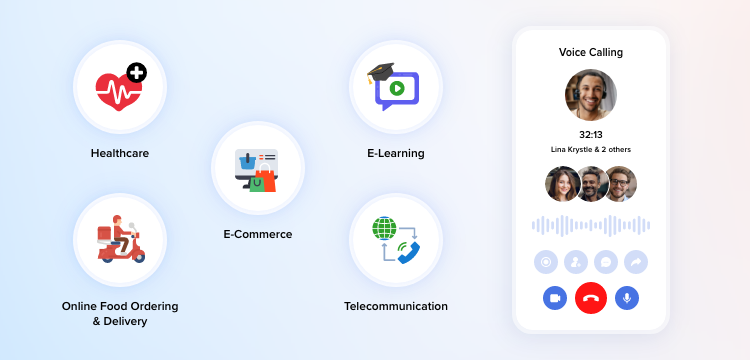
1. Healthcare Industry
Real-time communication APIs and SDKs connect doctors and patients instantly. It can help users schedule their appointments over calls, have virtual check-ups, and share their diagnostic reports, images and files with doctors. These communications are secure because voice calling APIs usually come as HIPAA compliant.
Recommended Reading
2. Online Food Ordering And Delivery Industry
Online food ordering industry falls under the category of on-demand industry. This industry is booming with the help of voice chat apps. It utilizes real time chat apps to connect to their customers every single day. Moreover, it helps their customers to have a track of their order, with location tracking.
3. E-commerce Industry
Again, E-commerce or online shopping falls under the on-demand category. And, real-time voice chat APIs in this field can bring customers and retailers on the same page and make shipping and purchases easy and secure. Through audio calls, buyers can be transparent about the product purchase without security being compromised.
4. E-learning Industry
The new trend has transformed the traditional way of education. It has made learning interactive and fun. These real-time messaging APIs and SDKs connect the students and teachers globally. Wherein, the students can have direct interaction with crystal clear voice quality. Also, it allows file sharing options during their online sessions.
To Wrap Up
Finally, if you still think that you need assistance in moving forward, let us help you. MirrorFly has been a leading and trusted provider of both SaaS and self-hosted voice chat SDKs. It has assisted so many industries worldwide in create their voice chat app in the best way possible & made integration of in-app voice calling APIs and chat SDKs/ in-app voice chats into any existing android or web app easy.
Get hands on our expertise-fueled features, unmatched scalability and security, military-graded pricing plans, and hosting options like on-cloud and self-hosted solutions.
Thus, feel free to contact us for further guidance on building your own AI voice chat app. We are ready to assist you with all your needs!
Thank You with Good Luck!
Looking To Build Your Own AI Agent + Voice Chat App?
Don’t build from scratch! MirrorFly provides 15+ conversational AI SDKs to help you launch a self-hosted voice chat app in just 24 hours
Request Demo 100% customizable
- AI voice agent
- Full source code
 100% customizable
Frequently Asked Questions (FAQ)
How do I make a voice chat app?
Here are the key steps to build your AI-powered voice chat app:
Step 1: Set up app permissions and declarations
Step 2: Create a connection service
Step 3: Enable call handling:
* Answer incoming calls
* Make outgoing calls
* End ongoing calls
Step 4: Handle calling limitations
How to add voice call features to mobile apps?
MirrorFly provides pre-built SDKs for Android, iOS, React Native, Flutter and JavaScript to add voice and video call features to your mobile apps. With MirrorFly SDKs, you can quickly build calling apps, powered by WebRTC protocols.
What is the cost to make a voice chat app?
It usually costs around $25000 to build a video calling app as a Minimum Viable Product (MVP). The overall cost can range up to $50000 if considering the cost of resource and development.
What is in-app voice calling?
In-app calling is a way of real-time communication that makes use of the internet to connect users using a technology called VoIP (Voice over Internet Protocol). The protocol transmits the audio and video data as packets between the peers to enable instant communication.
Is there an app similar to Discord?
Steam Chat is a chat app with voice calling functionalities built for gamers. This is a better alternative to Discord as it looks like the latter and can be easily adapted by the gamers who have used Discord.
Related Articles
- 10 Best Live Video Calling APIs In 2026
- How to Build a Live Video Chat App in 2026?
- How to Integrate Video Call API into Your Android & iOS Apps?


