

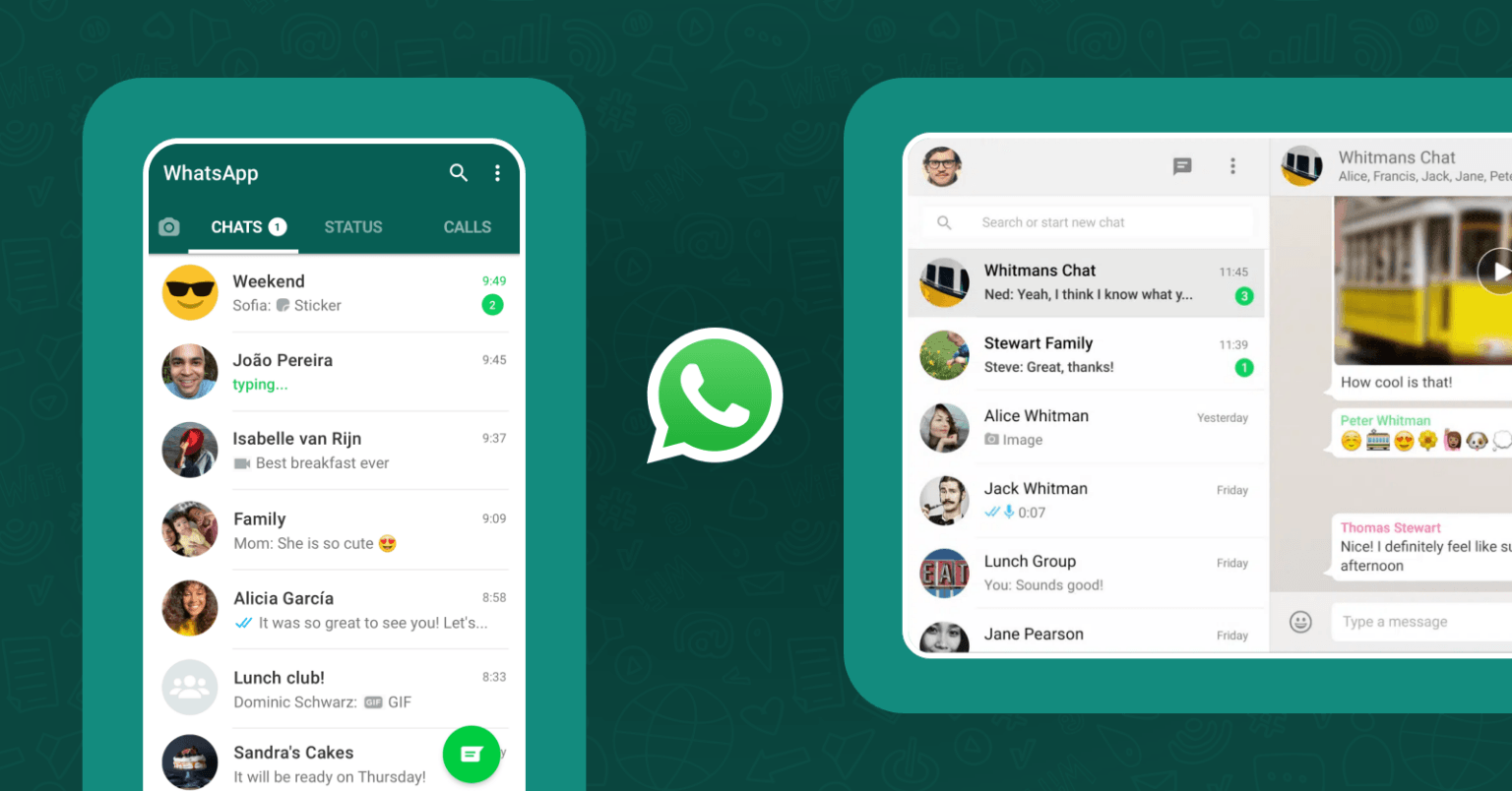


WhatsApp has turned into a basic necessity for today’s generation. Although WhatsApp Business is user-friendly and easy to launch for a business with a simple API, most enterprises choose to build their own platform considering data privacy and control.
In this article, I’ll explain how businesses big or small can build their own communication app like WhatsApp, without compromising on the features and experience.
Key topics covered in this article:
- Why Build a Chat App Like WhatsApp
- Steps to build your own app with a custom CPaaS
- Challenges you might face during the development
- Cost & Timeline of the project
Without any further ado, let’s get started.
Why Build A Chat App Like WhatsApp?
WhatsApp has become an essential part of everyday communication. The platform has become a baseline expectation for several business chat apps. Enterprises are trying to achieve the same experience as WhatsApp gives to its users. It’s easy to use, and meets the purpose just right on point.
When you build your own chat app instead of using an app like WhatsApp, you have all the control. You get to choose how your app looks, where your data is stored, and what features your team will use.
Ultimately, building your own app means you are not renting a communication infrastructure for your business, rather you own it all yourself.
WhatsApp vs a Self-Hosted Chat App: Head to Head Comparison
| WhatsApp / WhatsApp Business API | Self-Hosted Chat App (Like MirrorFly) |
| ❌ Limited Customization | ✅ 100% customization |
| ❌ Limited data ownership | ✅ Complete data ownership |
| ❌ Cloud-hosted only | ✅ Self-hosted, your servers |
| ❌ No source code access | ✅ Full source code access |
| ❌ Only pre-built security | ✅ Custom security |
Framework & Architecture of MirrorFly
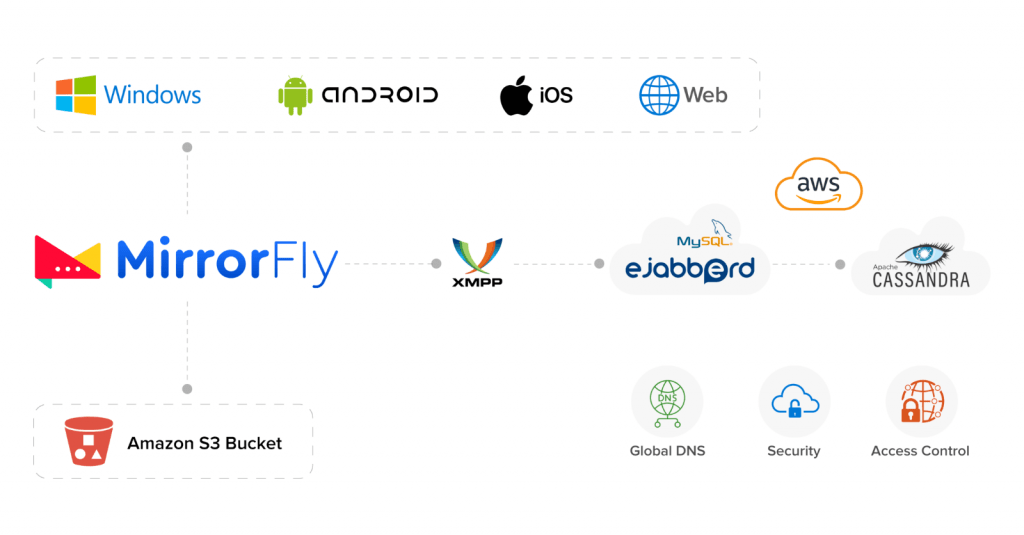
When a user triggers a message, the chat SDK sends a request to the Ejabbered server. In return the server checks for the availability of the recipient and if available, the delivery request is sent to the recipient’s SDK and then delivered. If the recipient is offline, the data is stored in the Ejabbered as the message will be queued in the server.
1. Ejabberd
Ejabberd, the open-source Jabber server has been customized by MirrorFly to improve operational efficiency. The XMPP protocol has also been customized to speed up signing in and re-signing in sessions. To protect the app from DDOS attacks and to prevent account spoofing, this mobile chat app solution has been encrypted with HMAC.
2. Mnesia And MySQL
For data storage, MirrorFly makes use of both Mnesia and MySQL. While Mnesia is used to maintain user login sessions, MySQL contributes to maintaining user details, right from account credentials to other personal data.
3. Cassandra Database
Chat logs are a key for instant messaging applications. In order to save chat history between several nodes, MirrorFly has deployed this database, which offers a good read and write speed, thus helping users retrieve chat logs as and when they need them.
4. Amazon S3 Bucket
Multimedia messages including audio, image, video are saved in the Amazon S3 bucket. Registration for the app usage can be done in multiple ways including mobile number, email, user name password and social login.
5. WebRTC
WebRTC is a source code that is used to build real-time communication (RTC) in browsers and mobile app.
MirrorFly has inbuilt WebRTC that allows its users to have VOIP (voice over the internet protocol) voice/video calls in their messaging app
6. Security
MirrorFly’s chat SDKs let you defend your chat platforms from any type of third-party intrusions, attacks, spam, and unwanted content with stringent security protocols like E2E, AES-256 bit, and TLS/SSL. Furthermore, its APIs are compatible with industry-regulatory standards like HIPAA and GDPR thus protecting user-sensitive data from exposure.
How to Build a WhatsApp-Like Chat App with MirrorFly
Having discussed the technicalities of WhatsApp, it is time to shift gears and analyze the possibilities of creating a self hosted WhatsApp alternative. There are plenty of secure messaging apps on the market that appear to be perfect WhatsApp clones. The reality is that many of the attempts to build WhatsApp-like apps are failing because they do not follow the technical aspects. Streamlining software testing services is the key to overcome failure and brings a successful app to life.
But what if we buy a third-party API rather than building secure a chat infrastructure from scratch? Won’t that be successful? Without a doubt, yes! With chat API providers like MirrorFly, you can easily build a WhatsApp-like chat app and architecture in the quickest time possible with the features you need.
MirrorFly is known to be one of the #1 and leading providers of Saas & Self-hosted chat SDKs that developers highly prefer for their quick integration capabilities, high-end messaging features, ultra-low latencies, and high scalability.
Plus, you can build the best customizable chat service for Android, iOS, and web apps without compromising on the security part. MirrorFly’s self-hosted chat SDKs for mobile and web also come as an ideal choice to build white-label messaging system for a one-time license cost.
Common Challenges In Building A Chat App Like WhatsApp
Just because WhatsApp is easy to use, it does not mean the development is effortless. Most teams struggle with building a truly user-friendly app like WhatsApp.
Here are some of the real-world challenges teams face during the process:
1. Reliability of Message Delivery:
Let’s say an user’s network connection drops. The order of messages must not change during delivery. Each message must be received in the correct order. If message queuing is not done right, users may get duplicate messages, miss out a few or deliver messages in the wrong order.
2. Scaling WebSocket or Server Connections:
Every user connects with the server persistently. If the number of users is small, it is easy to maintain this connection. But when the user count increases with thousands or millions of concurrent users might be a challenge without horizontal scaling and load balancing.
3. Managing Uptime & Downtime:
A chat app must be available all the time, especially when it is used for workplace communication. If an outage occurs even for a short time, it might impact the trust of the users. To curb such service disruptions, you need to implement redundant servers with failover systems.
4. Security & DDoS protection:
Messaging platforms are easy to get spammed, attacked with identity spoofing, or DDoS. This is why chat apps need strong end-to-end encryption, secure authentication, and DDoS protection.
5. Consistency of Maintenance:
The responsibility of a chat app developer does not end just with its launch. You need a dedicated team that manages the regular protocol updates, security patches and feature enhancements.
These technical and operational challenges are critical reasons why many businesses opt to build their messaging app with a ready-made chat SDK instead of building every component from scratch.
Cost & Timeline To Build A Chat App Like Whatsapp
There are two practical ways to build a chat app like WhatsApp: Build from scratch writing the code line by line or use a pre-built chat SDK.
- Building from scratch: This approach is a long and complex process. You’ll need to set up XMPP, run the servers, design the databases and maintain the complete infrastructure. Evidently, this approach gives full control of data, but the process is longer, and needs high investment.
- Building with a Chat SDK: When you build with a pre-built solution like MirrorFly, it already includes the complete features, storage and backend infrastructure you need for your platform. All you need to do is integrate the SDK, connect it to your server and go live. This approach also gives you full control of your data, while reducing the time and cost of development.
Comparison: Build It Yourself vs Build It with an SDK
| Comparison | Build It Yourself | Build It with a Chat SDK |
| Investment | 25K – 500K+ plus infrastructure costs | One-time license or subscription |
| Time to Launch | 6 – 12 months | As fast as 48 hours |
| Development | Build everything from scratch | Integrate the SDK and customize |
| Infrastructure | Manage servers, scaling, and security | Already handled |
| Maintenance | Ongoing updates and bug fixes | Managed by the SDK provider |
| Your Focus | Building the chat engine | Building your app experience |
MirrorFly’s Notable Features
- One-to-One & Group Chat
- Push Notifications
- Online Presence Indicator
- Topic-basedchat
- Lite-chat app integration in < 5 mins
- Video Conferencing
- File sharing (uploading large files without any worries)
- Chat history & Metadata
- End-to-end encrypted security
- Plug & Play UI Kits
- 24/7 Tech Support
Benefits of Using MirrorFly’s Chat SDKs
1. Build Your Own Customizable Chat App:
MirrorFly’s selfhosted messaging solution offers 100% customizable SDKs on 150+ call and chat features so developers can build a highly secure and scalable chat app.
2. Use our Chat APIs to host apps on your premises or cloud:
MirrorFly offers two deployment options for developers to host their chat apps. They can either opt for the ‘Pay-as-you-go’ model that would give them a dedicated space on MirrorFly’s cloud server, or if they wish to host it on their premises, our self-hosted messaging solution can be availed of.
3. Our Messaging SDKs are highly compatible to use:
Mirrrorfly’s chat SDKs are highly compatible with Android, iOS, and web platforms, as well as browsers like Firefox, Safari, and Chrome. Further, our APIs are highly adaptable to any programming language.
4. In-app messaging features that are industry-best:
MirrorFly’s in-app chat SDKs offer 150+ customizable high-end messaging features like single and group chats, push notifications, online presence indicators, read receipts, and quite a few more for both monthly subscriptions and one-time license costs. These features can be customized as per business requirements.
Conclusion
To summarize, this article covered the complete workflow of WhatsApp architecture and discussed the frameworks and architecture of the MirrorFly messaging SDK. With this guidance, you will be able to build instant messaging for business apps on your own with all the modern features that are available in WhatsApp and more.
Above this, we make your chat app deployment easier than ever!
As one of the leading self-hosted chat platforms, MirrorFly gives you the flexibility to deploy your chat apps on your own servers. Sounds interesting? Talk to our team of experts to learn more!
Are You Planning To Build Your Own Whatsapp-like Chat App?
MirrorFly’s customizable chat & video call solution helps you create an enterprise-grade messenger like WhatsApp with 1000+ in app chat features.
Request a Free Demo Complete Data Ownership
-
Host on Your Server
-
Hire Development Team
 Complete Data Ownership
Frequently Asked Questions (FAQs)
How long does it take to build a WhatsApp-like chat app?
It takes around 6 – 12 months to build an app from scratch. Using a pre-built chat SDK like MirrorFly or Apphitect, you can launch a WhatsApp-like messaging platform in less than 48 hours.
Can I build a chat app like WhatsApp for both Android and Web?
Yes. It is possible to build an app like WhatsApp for both Android and Web. Most chat SDKs are designed to work on both mobile and web environments.
What are the security risks of WhatsApp?
There are 3 major security and compliance issues with the Whatsapp app: lack of transparency, limited capacity to analyze data at scale and absence of archiving features.
How to design a chat application like WhatsApp?
1. Analyze the Whatsapp source code
2. Plan your app idea based on the source code
3. Choose the platform – iOS, Android or Web
4. Plan the user experience (UX)
5. Add the messaging features
6. Publish your app on Play Store or App Store
Is there a good alternative to WhatsApp?
Whatsapp is a popular messaging app with voice and video call features, but there are many other apps like Signal, Telegram and Wire that offer similar messaging features with end-to-end encryption, just like Whatsapp. If you’d like to build a whatsapp alternative on your own, you should consider a readily-available white-label chat solution like MirrorFly. So, you can reduce development time, customize the chat features and host the chat SDK on your own servers.
How safe is a self-hosted chat app?
A self-hosted chat app can provide robust security and privacy as it lets you take complete control of the chat infrastructure. You can implement multiple encryption layers, multi-level authentication and periodic updates to resolve potential security risks.
What technology is WhatsApp built on?
WhatsApp is built on native programming languages based on the platforms listed below.
1. Android: Java
2. iOS: Swift
3. Webapp: Javascript, HTML, and CSS
4. PC Desktop app: C/C#/Java
5. Mac Desktop app: Swift/Objective-C
How much does it cost to build a chat app like WhatsApp?
Building a chat app similar to WhatsApp costs between $25000 to $500000 or more along with charges for ongoing maintenance. Developing one with a chat SDK is comparably affordable as you’ll pay only once based on your business-specific requirements.


