



“WebRTC is estimated to grow at a CAGR of 34.37% with market value above $300 Billion by 2031”
In recent years, many companies have started to run their business online. And they are using video chat apps as an important tool to connect with clients and other businesses.
If you are one such business or individual looking to create a video chat app, this article is for you. In this article, I will walk you through the steps to create a video chat app with JavaScript and WebRTC peer-to-peer connection.
Let’s get started!
What is WebRTC?
WebRTC is a framework that enables Real-Time Communications (RTC) capabilities in browsers. It permits peer-to-peer communication without any server. It allows a direct exchange of audio, video and chat data between clients.
Why WebRTC For Communication Apps?
People use popular chat apps like Whatsapp, Signal and Telegram for business communication. But a dedicated e-conferencing app differs from a simple chat system in different ways.
To build one such app for your business, first you need to understand how video chat works.
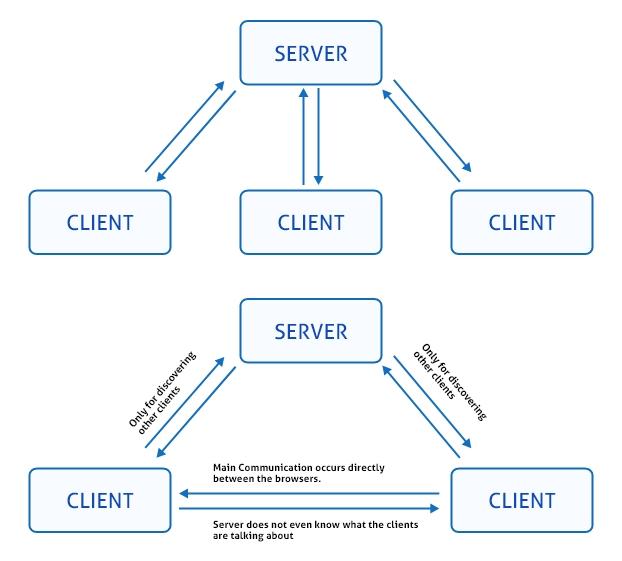
Let me explain this with a simple example. Imagine you are building a web video chat app. Now, you’ll need 2 browsers (clients) – a caller and a callee. To connect the caller and callee devices, you need a server in-between. This server will be responsible for exchanging the messages between both browsers.
In general, this is time consuming. Which means, the video/ voice data has to travel from the caller client to the server. Then the server has to deliver the data to the callee client. This is a long process and there is a huge opportunity for your voice and video to delay.
Imagine your users experiencing stutters and stammers on your app. Not welcome right?
What if we remove the server and connect the browsers directly?
This is exactly what WebRTC does in real-time video calls.
WebRTC is a technology that connects your client apps without a server.
With WebRTC, the role of the server is very limited. Which means, it supports two browsers to discover each other and connect directly.
So, can you build a web video app without WebRTC? Yes, but you might face typical issues like:
- Drop in connections
- Loss of data
- NAT traversal
- Echo cancellation
- Dynamic jitter buffering
- Automatic gain control
- Noise reduction and suppression
- Bandwidth adaptivity
Overall, you can eliminate these issues when you use WebRTC for your video calls. Besides, this technology doesn’t even require any plugins or third-party software. Moreover, being an open-source all its source codes are available for free at https://webrtc.org/
Also, all major browsers like Firefox, Bing and Chrome support WebRTC.
Note: Check the compatibility of the WebRTC video call before you start.
Now, without any ado, let us understand in detail.
- Complete Source Code
- Lifetime Data Ownership
- Deploy on Own Server
Benefits Of WebRTC In Video Chat App Development
WebRTC is an ideal technology if you are planning to build real-time communication features into your apps without a server. You can easily develop the following interaction features into your apps:
- Text Communication:
This allows the user to communicate over text in a real-time chat experience on all the Webrtc audio and video-enabled iOS/Android chat apps.
- Voice Communication:
Based on Voice-over IP technology in real-time over the Internet through chat applications. Low latency is carried to make 1-to-1 or 1-to-many WebRTC voice chat app connections across all the devices.
- Video Communication:
Video Connection helps in making quality WebRTC-enabled video and audio calls on Android/iOS chat apps continuously at low latency.
WebRTC: Exploring The Technology In Detail
WebRTC Compatible Platforms
- Desktop:
- Chrome, Firefox, Opera
- Mobile:
- Android & iOS support
Functional Dependencies of WebRTC
Before getting into the building of a real-time WebRTC video chat app, let us be clear in identifying the functional dependencies to be used to build WebRTC Android/iOS and Web chat App.
- Thorough WebRTC Library
A complete WebRTC peer-to-peer native code package is required for every developer who wishes to use WebRTC API for chat app development for Android, iOS or web browsers.
- jQuery
jQuery is used to handle the event manipulation and simplify the HTML with the easy to use APIs that work on several browsers.
- Semantic UI CSS:
A framework used to contrive responsive layouts through human-friendly HTML with an elegant CSS framework that works on embellishing the user experience of the Chat Platform.
- Handlebars
A compatible template provides the potential power to build semantic templates in HTML language. This brings significant changes in the mobile devices to embed simple WebRTC messaging features on Android and iOS platforms.
API & Objects In WebRTC
Apart from dependencies, there are several frameworks and functionalities required to build a chat app with WebRTC enabled video and voice calling.
Below mentioned are the APIs and Objects in WebRTC:
- API in WebRTC
- getUserMedia(): This is a WebRTC API. It’s a method that you can call in your JavaScript code to request access to the user’s camera and microphone.
- Objects Used In WebRTC
- MediaRecorder: This is an object that you create in your JavaScript code. It’s used for recording media streams, such as audio and video, which you obtain through the getUserMedia() API.
- RTCPeerConnection: This is also an object that you create in your JavaScript code. It’s responsible for managing the peer-to-peer connection and handling the negotiation of media streams between peers.
- RTCDataChannel: This is an object that you create to establish a data channel between peers for transmitting arbitrary data.
Exploring The WebRTC Infrastructure
Initially, both video and voice call functionalities depend on the streaming media between two client servers connected to each other.
Voice Over Internet Protocol (VoIP) is one of the most familiar and trusted standard techniques for voice and live video chat apps over the Web.
Video / Audio Transmission of Chat Application
As we are very much aware of, WebRTC is the significant implementation for streaming media content from one client-server to another.
- Signaling
- STUN Server
- TURN Server
Let’s look into the details:
Signaling “The Connecting Mode”
Signaling is one of the most important concepts, wherein before communication the two peers must know the information about each other to connect. These information includes,
- The update about the presence of any other peer for communication
- Network data like peer’s IP address and port
- Session-control messages – used to open and end up communication
- Error messages
- Media metadata, this includes codecs, codec settings, band.
- width, and media types
- Key data that are needed for secure connections
This information is known as metadata that is the must for any direct connection to take place. For signaling the availability of a server is a must.
Signaling initiates the initial communication between the two browsers. During this process, the peers exchange information about other peers. Once this data is shared, it creates a direct connection between the peers. This signaling mechanism is used until the establishment of direct connection.
Session Description Protocol
This is a format that describes multimedia communication sessions for announcements and invitations. It supports the streaming media application that includes VoIP and video conferencing. Here, the signaling methods and protocol are not specified by WebRTC. We have to build it by ourselves.
As already known, WebRTC requires two peers as offers and answers to have a data exchange; these Session Description Protocol (SDP) formats are needed to communicate.
The Session Description Protocol format seems like the below:
- v=0
- o=- 7614219274584779017 2 IN IP4 127.0.0.1
- s=-
- t=0 0
- a=group:BUNDLE audio video
- a=msid-semantic: WMS
- m=audio 1 RTP/SAVPF 111 103 104 0 8 107 106 105 13 126
- c=IN IP4 0.0.0.0
Based on the audio/ video on your device, the above codes are automatically created by WebRTC.
Now, let’s move-on to understand how these work together.
How Does WebRTC Work In Your Video Chat App?
Before getting into the process, it’s better to have some knowledge about IP Addresses and PORTS.
IP address is the identification number of each device that is connected to the internet. Whereas the Port number specifies the process through which an internet or other network message will be forwarded from one end to another.
Moreover, the port number is majorly used so as the data can be directed to the current location within the device. However, in general each device which is connected to the internet has an IP Address and Port, typically 65,536.
To Begin With The Working Process And APIs:
These RTCPeerConnection APIs and signaling are all about offer, answer, and candidate. Let’s see in detail
You can use the The RTCPeerConnection API to stream audio and video between users. The signaling works together with RTCPeerConnection. It establishes a direct connection among the browsers.
Moving ahead ,let’s have a look at how the entire process of RTCPeerConnection is carried over. To begin with, this process involves two steps,
The use of metadata – get the the local video and audio media conditions that is to send the data via signaling
And another one, to get potential network addresses to host the app.
When you get the metadata like resolution and codec capabilities, the signaling mechanism exchanges them between the remote servers.
Let’s understand the scenario with an example. For instance, imagine there are two users ‘X’ and ‘Y.’
If suppose, X calls Y – then there is a possibility that the below steps will take place in the media conditions:
Once the local voice and video data like resolution and codec capabilities has been ascertained, it should be exchanged with a signaling mechanism using remote browsers.
Let’s understand the scenario with an example. For instance, imagine there are two users ‘X’ and ‘Y.’ If suppose, X calls Y – then there is a possibility that the below steps will take place in the media conditions when they both share the information,
- X will create RTCPeerConnection object
- X will create an offer with RTCPeerConnection createoffer() method
- Now, X calls setLocalDescription() to set the created offer as the description of local media
- Then X makes the offer using signaling mechanism to send the same to Y
- Y calls setRemoteDescription() with X’s offer, so that his RTCPeerConnection can be known of all X’s set up
Now, Y calls createAnswer() depending upon the X’s data. Thus,the success callback function for this is generated with Y’s answer
- Y set X’s answer as the local description by calling upon setLocalDescription()
- Y then uses the signaling mechanism to send her the answer via signal
- X sets Y’s answer as the remote session description with setRemoteDescription
Now, with this X and Y will also exchange the network information. Here, “finding candidate” uses the ICE framework to identify the network interfaces and ports .
Once all the above procedure has been done X creates an RTCPeerConnection object with an onIcecandidate handler
This handler will be called only when the network candidates are available
In the handler, X sends signal candidate data to Y via their signal mechanism
And when Y get a candidate message from X, then Y will call addIceCandidate() to add the candidate to the remote peer description
WebRTC supports ICE Candidate Trickling. This means, the callers provides candidates with the callee once they make the initial offer. So, the callee can automatically begin the call and set up a connection, without waiting for other candidates to arrive.
On the whole, the integral point to be noted is that WebRTC automatically creates ICE candidates once the offer is created. Thus, we are supposed to implement the method that is needed to receive and send these candidates through signaling.
Once the information about media conditions and ICE candidates is shared among the two peers, the WebRTC automatically creates a direct connection among both peers to have any video chat or other conversation.
Done with Signaling — Brings About ICE to cope with NATs and firewalls
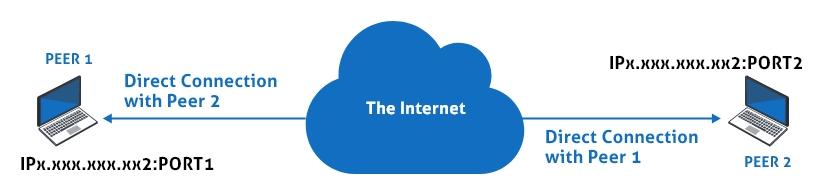
Getting the WebRTC connection for video chat with a unique IP address and PORT number and having them exchanged among the peers to communicate directly, might sound simple but it is far more difficult. This is so as due to two factors that can cause issues over here. So, it is vital to deal with these issues before making use of any web video conferencing application.
Let’s check on these two causing issues/factor,
1) NAT
Network Address Translation (NAT) is the process where one or more local IP addresses are translated into one or more Global IP addresses simply to provide internet access to the local hosts.
Well, we all know that it’s the address that identifies a device connection on the internet. Thus, everybody thinks that all the devices will have a unique IP address, but that’s not the truth.
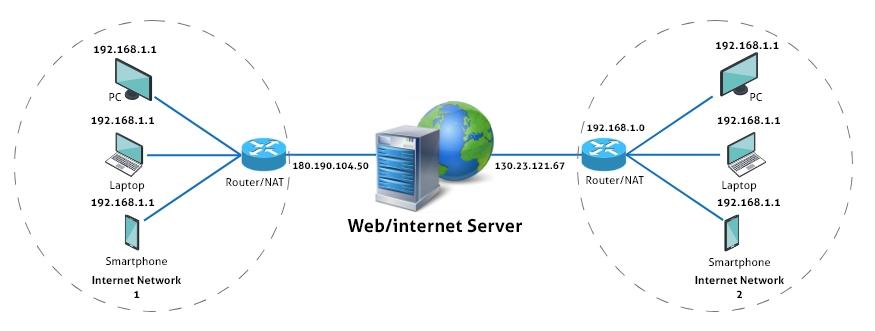
Generally, an IPv4 address is 32 bits long that specifies that there are about 4 billion unique addresses (2³² = 4,294,967,296)available overall. But, it has been found that in 2018 alone, there were about 22 billion devices that were connected to the internet.
Now, you might be thinking how is it possible? – How come 22 billion devices can connect on the internet when there are only 4 billion possible unique addresses available? right!
For that, the answer is “NAT.”
Here, the entire story takes a turn when these IP addresses are divided into two categories – Public IP Addresses and private IP Addresses.
Now, public IP addresses can be assigned only to one device which is not the case with the private IP address. The idea of NAT is to provide multiple devices with access to the internet via a single public address.
So, this indicates that each device will have the information about its private IP address alone and not about the public IP address of the router. Moreover, during the Google search also the google will track and tell you about the public IP address of the router only.
Thus, we can say each device will have two IP addresses, both private IP address as well as public IP address. In this scenario, the network candidates contain the details about only the device’s private IP addresses. It will not be aware of public IP addresses at all. So, now it is an extra task for us to find a way for the browser to know the Public IP address for the candidate to create a public IP address.
Henceforth, STUN (Session Traversal Utilities for NAT) server is used. Here, when the device makes a request to the STUN server, the STUN will respond back with a message. It contains the public IP of the router and helps the browser to generate candidates.
2) Firewall
Firewall is a network security device that monitors the incoming and outgoing network traffic. It also decides whether there is a need to allow or block a specific traffic or not, all that’s depending upon the defined set of security protocols.
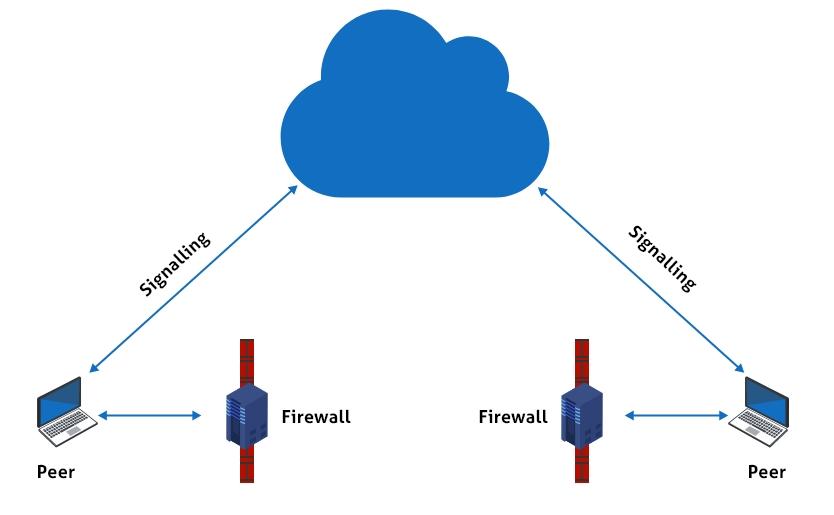
Now, let’s see how this firewall creates a problem when it comes to WebRTC.
Well, to resolve the firewall issue here we need to utilize a TURN (Traversal Using Relay NAT) server. TURN server relays the traffic directly between the two browsers or peers, when direct peer to peer connection fails.
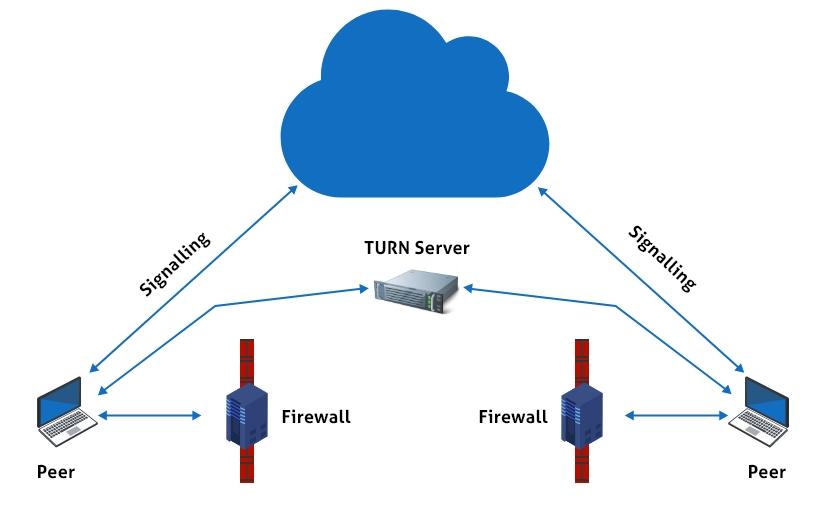
Now as we know, these STUN and TURN servers are used to make peer-to-peer connections using WebRTC. We can integrate a TURN/STUN with a WebRTC video chat app, simply by passing an object containing the URLs of TURN and STUN servers to the RTCPeerConnection as its argument.
Recommended Reading
Let’s have an illustration using coding for better clarity about the entire concept.
WebRTC Coding Sample
[su_box title=”WebRTC Coding Sample”]//Object containing TURN/STUN URLs. var pcConfig = { ‘iceServers’: [ { ‘urls’: ‘stun:stun.l.bing or google.com:19302’ }, { ‘urls’: ‘turn:192.158.29.39:3478?transport=udp’, ‘credential’: ‘l;;OjdsfjGRntt2u2uiw=’, ‘username’: ‘786543:6789098744’ }, { ‘urls’: ‘turn:192.158.29.39:3478?transport=tcp’, ‘credential’: ‘l;;OjdsfjGRntt2u2uiw=’, ‘username’: ‘786543:6789098744’ } ] }…….. //Passing the above object to RTCPeerConnection RTCPeerConnection(pcConfig);[/su_box]In the above example we have to pass the URL alone, the rest of the thing will be managed by WebRTC.
Have a look at the illustration diagram with all the connections that are made during the live calls using Javascript and WebRTC technology.
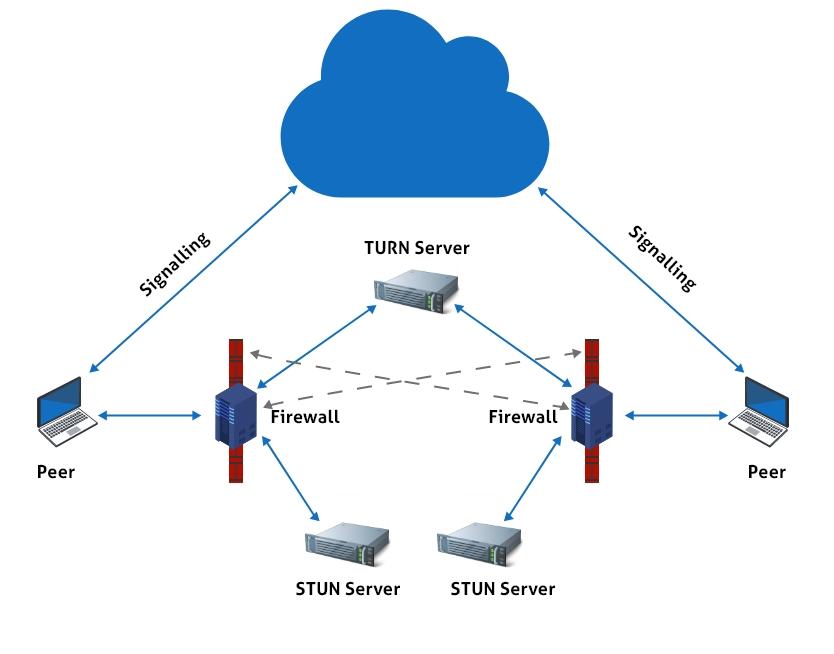
However, during the entire process there are certain points that need to be made an account-of. This includes,
It’s quite usual to have a successful connection using a STUN server without the need of TURN. But sometime, TURN server are also used to make calls
Some of the organizations like XirSys gives out TURN and STUN server for free
This is the beginning of the steps to build a JavaScript video chat app. But there is much more to explore when it comes to implementation. We will have a look into it in our future blogs, so stay alert and get to know more about it.
Thank you!
Build Your Own Custom WebRTC Video Chat App?
Get our enterprise-grade communication solution, that can be set up on your company servers.
Request Demo 100% customizable
- Topic-based Chat
- Full source code
 100% customizable
Frequently Asked Questions
How to Clone Video Chat Web App using WebRTC?
To create a clone video chat web app using WebRTC you need to follow the below steps,
– Implement the client application
– Use the AWS Websockets to create simple chat application
– Now, host the Stun/Turn Server in an Ubuntu AWS EC2 instance
– Make use of serverless framework
– Go ahead with deployment of your video chat web app
How to Build A WebRTC Video Chat App with JavaScript?
To make a video chat app in WebRTC with JavaScript the below given steps need to be followed,
– Need to set up the project with installation of dependencies
– Create the backend for signaling purpose
– Create a file index.js
– Initialize the express and HTTP Server
– Implement the Socket.IO
– After creating the backend, now create chat app’s frontend
– Create HTML file and add the CSS code
– Add the STUN/TURN URLs
Once, done with entire process deploy the video chat app on some local host and test it.
Is It Possible To Make A Video Chat Application Without A Server?
No, it is not possible to make a video chat app without a server as you need some support to transmit the data. So, you can use WebRTC with UDP ports to make this exchange of media metadata between the users.
How To Build A Multi-User Video Chat With WebRTC?
Start with the createAnswer() function for each peer variable after calling upon createOffer(). However, you can use a centralized model with a WebRTC Media Server in between.


